How to conduct keyword research for WooCommerce
Understanding Keyword Research for WooCommerce
Keyword research is the backbone of any successful online store. If you’re operating a WooCommerce site, understanding how to conduct keyword research for WooCommerce will set you up for success. But why is keyword research important? It helps you discover what your potential customers are searching for, allowing you to optimize your product listings and content accordingly. When you align your offerings with the search intent of your audience, you’re more likely to drive traffic, boost conversions, and increase sales.
Think of keyword research as a treasure map. It guides you to the most valuable keywords that can lead to sales. Without it, you’re essentially navigating in the dark. In this section, we’ll explore the fundamentals of keyword research, including what makes a keyword valuable, types of keywords, and the key tools you can use to get started.
Types of Keywords for WooCommerce
When diving into keyword research for WooCommerce, it’s crucial to understand the different types of keywords you’ll encounter. Broadly speaking, keywords can be classified into three categories: short-tail, long-tail, and local keywords. Each serves a unique purpose and targets different segments of your audience.
Short-tail keywords are typically one or two words long and have high search volumes. For instance, “shoes” is a short-tail keyword. While they attract a lot of traffic, they often lack specificity and can lead to high competition, making it harder for your WooCommerce store to rank.
Long-tail keywords, on the other hand, are more specific phrases that usually consist of three or more words. An example would be “best running shoes for flat feet.” These keywords might get less traffic, but they usually have lower competition and higher conversion rates since they target users who are further along in the buying cycle.
Lastly, local keywords are essential if you have a physical store or offer services in specific locations. For example, “buy shoes in New York” helps attract a local audience. Understanding these types of keywords will empower you to choose the right ones for your WooCommerce store.
Tools for Conducting Keyword Research
Now that you understand the types of keywords, let’s explore some of the most effective tools for conducting keyword research for WooCommerce. Each tool has its unique features, and using a combination will yield the best results.
Google Keyword Planner is a free tool that offers insights into keyword search volume and competition. It’s user-friendly and ideal for beginners. Simply enter a keyword, and the tool provides data on related keywords as well as their search volume.
Ahrefs is a premium tool that allows you to analyze competitors and discover keywords they rank for. It provides in-depth keyword metrics like keyword difficulty, search volume, and click-through rates. If you want to get serious about your keyword strategy, Ahrefs is worth the investment.
SEMrush is another powerful tool that not only helps with keyword research but also offers insights into PPC keywords and backlinks. Its keyword magic tool allows you to discover long-tail keywords easily, thus enhancing your WooCommerce SEO strategy.
Finally, consider utilizing Ubersuggest, a free tool from Neil Patel that provides keyword suggestions, search volume, and competition analysis. This tool is great for those just starting out with keyword research.
Steps to Conducting Keyword Research for WooCommerce
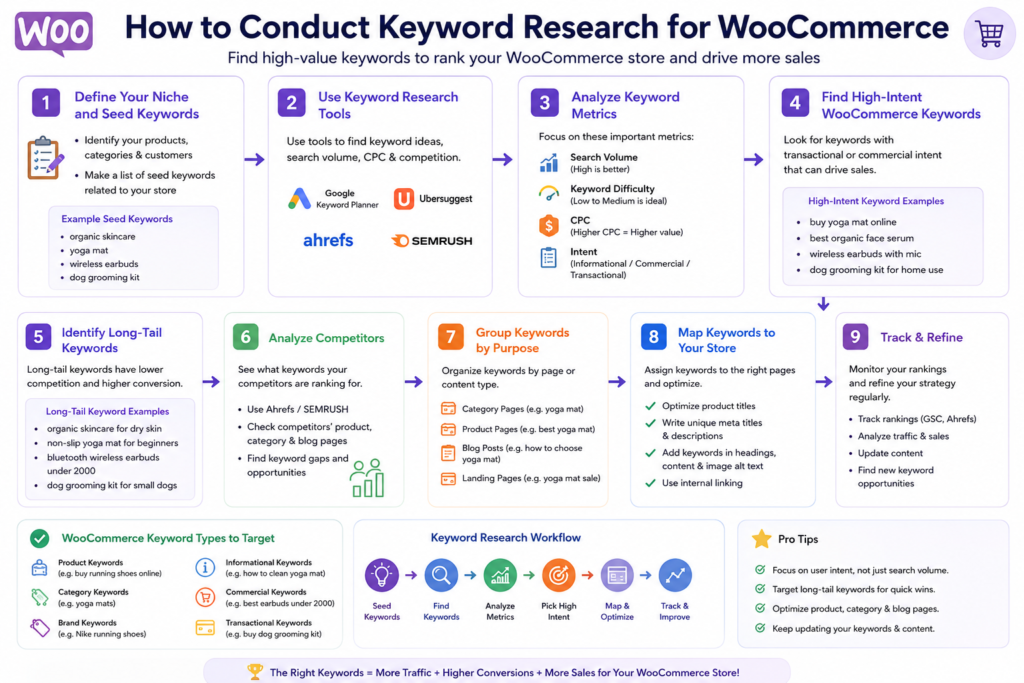
Conducting keyword research might seem daunting, but breaking it down into manageable steps can simplify the process. Here’s a step-by-step guide to help you navigate through keyword research for your WooCommerce store. Boost Your Sales with a WooCommerce Bulk Product Description Writer
- Identify Your Niche: Start by clearly defining what your WooCommerce store offers. What products do you sell? Who is your target audience? Understanding your niche will help you focus your keyword research.
- Brainstorm Seed Keywords: Think of initial keywords that best describe your products or services. For example, if you sell handmade jewelry, your seed keywords might include “handmade jewelry,” “artisan necklaces,” and “custom rings.”
- Use Keyword Tools: Utilize the tools mentioned earlier (like Google Keyword Planner and Ahrefs) to input your seed keywords and discover related keywords, along with their search volumes and competition.
- Analyze Competitors: Look at your competitors’ websites and see what keywords they’re ranking for. This can provide insights into which keywords are worth targeting.
- Prioritize Keywords: Based on search volume, competition, and relevance to your products, prioritize your list of keywords. Focus on long-tail and local keywords for better targeting.
- Test and Optimize: Once you’ve implemented keywords into your product listings and content, monitor your rankings and traffic. Optimize your strategy based on what works and what doesn’t.
Following these steps will guide you through the keyword research process and help you establish a solid foundation for your WooCommerce store’s SEO strategy.
Integrating Keywords into Your WooCommerce Store
Once you’ve conducted thorough keyword research, the next step is integrating those keywords into your WooCommerce store effectively. This process is crucial because it influences how search engines interpret your site and determine its relevance to user queries.
Start by incorporating your primary keywords into your product titles and descriptions. Make sure they naturally fit into the text, as keyword stuffing can harm your rankings. For example, instead of simply stating “shoes,” you might say, “Shop our collection of running shoes designed for comfort and performance.” This approach not only improves SEO but also enhances user experience.
Next, utilize your keywords in meta descriptions, alt tags for images, and URLs. Each of these elements plays a role in how search engines index your site. A well-optimized meta description can significantly impact your click-through rate, making it more likely that users will choose your link over a competitor’s.
Lastly, consider creating content pieces around your keywords, such as blog posts or guides. For example, writing a post titled “How to Choose the Best Running Shoes” allows you to target various long-tail keywords while providing valuable information to your audience.
Measuring the Success of Your Keyword Strategy
Conducting keyword research for WooCommerce is just the beginning; you also need to measure the success of your strategy. Tracking specific metrics can provide insights into how well your keywords are performing and where adjustments might be needed.
Start by monitoring your website’s organic traffic. Tools like Google Analytics allow you to see how much traffic is coming from search engines and which keywords are driving that traffic. Pay attention to metrics like bounce rate and average session duration to gauge user engagement.
Additionally, keep an eye on your keyword rankings. Tools like SEMrush and Ahrefs can help you track how your chosen keywords are performing over time. Are you moving up in rankings? Are certain keywords consistently bringing in traffic while others are not? This information can guide your future keyword research and optimization efforts.
Finally, remember to assess conversion rates. Ultimately, the goal of keyword research is not just to drive traffic but to convert visitors into customers. Use tools like Google Analytics to track conversions and sales associated with specific keywords, helping you understand what’s working and what needs improvement.
Common Mistakes to Avoid in Keyword Research
While conducting keyword research for WooCommerce, it’s easy to fall into common traps that can hinder your success. Being aware of these mistakes can save you time and help you develop a more effective strategy.
One of the biggest mistakes is focusing solely on high-volume keywords. While these keywords can attract a lot of traffic, they often come with stiff competition. Instead, consider targeting a mix of high-volume and low-competition keywords to find that sweet spot. Auto-Republish Old WordPress Content: Boost Your Traffic
Another common error is neglecting to analyze user intent. Understanding why someone is searching for a specific keyword is crucial for optimizing your content. Keywords with commercial intent, like “buy running shoes,” should be prioritized over informational queries like “what are running shoes?”
Lastly, don’t forget to regularly update your keyword strategy. The online market is always evolving, so staying current with trends and consumer behavior is essential. Regularly revisiting and refining your keyword list will keep your WooCommerce store competitive.
Advanced Keyword Research Techniques
Once you’re comfortable with the basics of keyword research for WooCommerce, it’s time to explore advanced techniques that can give you an edge over competitors. These methods allow you to dig deeper and uncover opportunities that others might miss.
One advanced technique is utilizing competitor gap analysis. This involves identifying keywords for which your competitors rank but you do not. By using tools like Ahrefs or SEMrush, you can uncover these gaps and target them in your strategy.
Another effective method is leveraging customer feedback and queries. Pay attention to questions your customers frequently ask and incorporate those into your keyword strategy. This not only helps in targeting long-tail keywords but also aligns your content with your audience’s needs.
Finally, consider using data from social media. Platforms like Twitter and Reddit can offer insights into trending topics and discussions in your niche. By identifying the keywords or phrases that resonate with users, you can tailor your content and product offerings accordingly.
Conclusion
Conducting keyword research for WooCommerce is not just a task; it’s an ongoing process that can significantly influence your store’s success. By understanding the different types of keywords, utilizing various tools, and integrating keywords effectively, you can optimize your WooCommerce store for search engines and customers alike. Remember to measure your success, avoid common mistakes, and explore advanced techniques to stay ahead in the competitive eCommerce landscape. With the right approach, your WooCommerce store can attract the traffic and conversions it deserves.
FAQs
1. What is the best tool for keyword research for WooCommerce?
The best tool often depends on your needs, but Google Keyword Planner and Ahrefs are popular choices among WooCommerce store owners for their comprehensive data and user-friendly interfaces.
2. How often should I conduct keyword research?
It’s a good idea to conduct keyword research at least once every few months. Trends change, and new keywords may emerge, so regular updates can help you stay competitive.
3. Can I use keywords from my competitors?
Yes, analyzing competitors can provide valuable insights. Use their successful keywords as inspiration, but ensure you also focus on your unique offerings.
4. Do I need to focus on local keywords for my WooCommerce store?
If you have a physical store or serve specific local areas, yes! Local keywords can help you attract customers in your vicinity.
5. How do I know if my keywords are performing?
Monitor your website’s analytics, focusing on organic traffic, keyword rankings, and conversions. Tools like Google Analytics and SEMrush can provide valuable insights.