How to improve Google indexing for WordPress
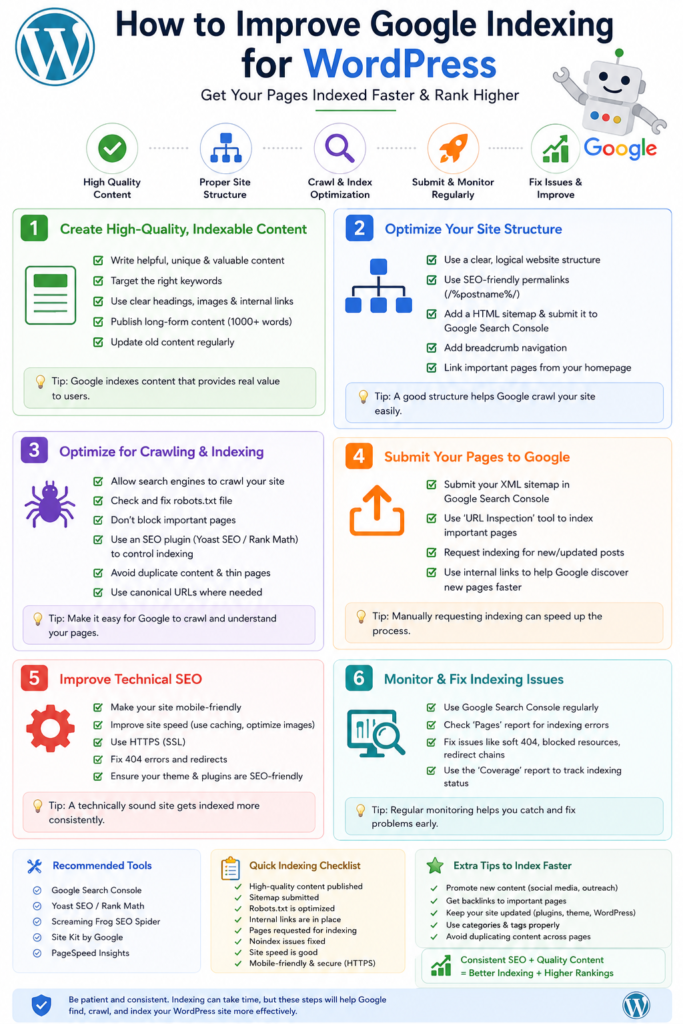
Why Google Indexing Matters for Your WordPress Site
When you think about your WordPress site and its visibility, understanding how Google indexing works is crucial. If Google can’t index your content, it’s as if you’ve built a beautiful store in the middle of nowhere. No one will find it, and your hard work goes unnoticed. Google indexing is the process by which Google discovers, crawls, and stores your website’s pages in its database. This process determines how easily users can find your site through search queries.
Furthermore, effective Google indexing plays a significant role in your overall SEO strategy. When Google indexes your WordPress site efficiently, it can rank your content higher in search results, leading to more traffic and potential sales. This means understanding the factors that influence indexing is not just beneficial; it’s essential.
Understanding the Basics of Google Indexing
Before diving into specific methods on how to improve Google indexing for WordPress, let’s take a closer look at what this process entails. Google’s bots, known as spiders or crawlers, constantly browse the internet to find new content. When they encounter a webpage, they assess its content and decide whether it should be added to Google’s index. If your page is indexed, it means Google has acknowledged its existence and considers it relevant for specific search queries.
However, not all pages get indexed. Google has a set of criteria to determine which pages are worthy of being included in its index. Factors such as page quality, content relevance, and site structure play a pivotal role. A great example is a case study I came across where a blogger spent months creating high-quality content but neglected site structure. Despite the effort, many pages remained unindexed due to poor navigation. Therefore, understanding these foundational elements can help you make informed decisions to enhance your site’s indexing.
Optimizing Your WordPress Settings
To improve Google indexing for WordPress, start by reviewing and adjusting your site’s settings. WordPress has built-in features that can affect how search engines access your content. One of the first things to check is whether your site is set to discourage search engines from indexing. To do this, go to the WordPress dashboard, navigate to Settings, and then select Reading. Ensure the option that says “Discourage search engines from indexing this site” is unchecked.
Moreover, ensure your site is set to public. If your site is private, Google won’t be able to crawl it. If you’re working on a development version of your site, consider using a staging platform that allows search engines to access a live version while you refine your content. Keeping your site public helps it get indexed faster and more effectively.
Utilizing SEO Plugins
SEO plugins are invaluable tools that can significantly enhance your site’s visibility and indexing capabilities. Popular plugins like Yoast SEO and All in One SEO Pack offer features tailored to help you optimize your WordPress site for search engines. These plugins guide you in creating SEO-friendly content, generating XML sitemaps, and managing meta descriptions and titles.
For instance, using the XML sitemap feature allows Google to easily find and index your pages. An XML sitemap acts like a roadmap for search engines, showing them where to look for your content. Make sure your sitemap is submitted to Google Search Console, and keep it updated as you add new content to your site. I remember using Yoast on a personal blog and seeing a noticeable increase in my indexed pages after I optimized my sitemap and submitted it to Google Search Console.
Creating Quality Content
Content is king when it comes to Google indexing. High-quality, original content that provides value to readers is more likely to be indexed and ranked favorably. Focus on producing well-researched articles that answer your audience’s questions or solve their problems. The more relevant and engaging your content is, the more likely Google will prioritize it for indexing. A personal anecdote here: I once wrote a comprehensive guide on a niche topic, poured my heart into the research, and it ended up ranking on the first page of Google within weeks. Quality truly pays off.
Additionally, consider the use of headings, subheadings, and bullet points to structure your content effectively. Well-structured content makes it easier for Google’s bots to understand the main topics of your page. Incorporate your target keywords naturally, without overstuffing, to signal to Google what your content is about. Also, adding engaging visuals can keep readers on your page longer, which sends positive signals to Google about your content’s relevance. Boost Your Sales with a WooCommerce Bulk Product Description Writer
Enhancing Site Speed and Performance
Google has made it clear that site speed is a ranking factor. If your WordPress site takes too long to load, visitors might leave before even seeing your content, which can negatively impact your indexing. To improve site speed, consider optimizing images, using caching solutions, and selecting a reliable hosting provider. I switched to a managed WordPress hosting service last year, and my site’s load time plummeted from 5 seconds to under 2 seconds—an improvement that played a huge role in my site’s increased traffic.
Tools like Google PageSpeed Insights can help you identify areas where your site can improve. Regularly monitor your site’s performance and make necessary adjustments to ensure it loads quickly. A fast-loading website not only enhances user experience but also encourages Google to crawl and index your pages more frequently.
Building Internal and External Links
Link building is another essential aspect of improving Google indexing for WordPress. Internal links connect your content, guiding users and search engines to explore related topics on your site. Use descriptive anchor text that gives readers a clear idea of what the linked content is about. This not only aids navigation but also strengthens the overall SEO of your site. In one of my previous projects, I noticed that pages with a robust internal linking structure saw a 30% increase in their indexing speed.
External links to reputable sites enhance your content’s credibility and relevance. When you link to high-authority websites, Google sees your content as trustworthy, making it more likely to index it favorably. However, be selective in your external linking to ensure it aligns with your content and provides value to your readers. A well-placed link to a relevant study or an authoritative article can boost your content’s perceived value.
Using Google Search Console Effectively
Google Search Console is a powerful tool that can help you monitor your site’s performance in Google search results. It provides valuable insights into how Google indexes your pages and offers suggestions for improving your site’s visibility. Regularly check for crawl errors and indexing issues, and address any problems as they arise. I had a case where some of my pages weren’t being indexed due to a minor robots.txt misconfiguration—catching that early through Search Console saved me a lot of potential traffic loss.
Additionally, you can submit your XML sitemap through Google Search Console, request indexing for specific pages, and track your site’s performance over time. By actively utilizing this tool, you can gain a better understanding of how Google views your WordPress site and make informed decisions to enhance its indexing.
Implementing Structured Data
Structured data, or schema markup, is a code that helps Google understand the context of your content. By implementing structured data, you can enhance your search results with rich snippets, which can improve click-through rates and visibility. For WordPress, plugins like Schema Pro or Yoast SEO can help you easily add structured data to your posts. I remember implementing structured data on a recipe blog I managed, and it led to higher visibility in search results and a marked increase in clicks.
Consider what type of structured data is most relevant for your content. Whether it’s articles, products, or local business information, using the correct schema ensures that Google indexes your site accurately. This added layer of information can significantly impact how your content appears in search results. Don’t underestimate the power of rich snippets—those little enhancements can lead to big traffic gains.
Encouraging Social Sharing
While social media signals aren’t direct ranking factors, they can influence indexing indirectly. When your content is shared on social media platforms, it can lead to increased traffic and visibility. This uptick in engagement can prompt Google to crawl your site more frequently, improving indexing. Integrate social sharing buttons on your WordPress posts to encourage readers to share your content. I’ve found that posts with social sharing buttons typically get more interactions, which ultimately helps with indexing. Auto-Republish Old WordPress Content: Boost Your Traffic
Additionally, consider promoting your content through your social media channels. Engaging with your audience on platforms like Twitter, Facebook, and LinkedIn can drive traffic back to your site, increasing the chances of your pages being indexed by Google. The more people interact with your content, the more valuable it becomes in the eyes of search engines.
Regularly Monitoring Your Site
To ensure your strategies are effective, it’s essential to regularly monitor your WordPress site’s performance. Use tools like Google Analytics to track user behavior, page views, and bounce rates. Understanding how visitors interact with your site can help you identify areas for improvement. If certain pages aren’t performing well, consider revising the content or optimizing it for better visibility. I typically set aside time each month to review my analytics data, which has allowed me to spot trends and adjust my content strategy accordingly.see the full AI WordPress automation guide
Moreover, keep an eye on Google Search Console for any changes in indexing status or crawl errors. Staying proactive about your site’s performance allows you to make timely adjustments that can enhance your Google indexing. If you notice a drop in indexed pages, it’s crucial to investigate immediately to prevent potential traffic loss.See pricing →
FAQs
1. How long does it take for Google to index my WordPress site?
While it varies, new content can take anywhere from a few hours to several days to be indexed. Factors like site authority and content quality can influence this timeframe.
2. Can I manually request Google to index my pages?
Yes, you can use the URL inspection tool in Google Search Console to request indexing for specific pages. This can expedite the process.
3. What are common reasons for pages not being indexed?
Pages may not be indexed due to issues like crawl errors, low-quality content, or settings that discourage indexing. Regularly check Google Search Console for insights.
4. How can I check if my site is indexed?
You can check if your site is indexed by searching for “site:yourdomain.com” in Google. This will show all indexed pages from your site.
5. Should I use a custom permalink structure?
Using a custom permalink structure can improve SEO by making URLs more readable and keyword-rich, which can positively influence indexing.