AI WordPress Automation in 2026: 100 Posts/Month, Zero Writing
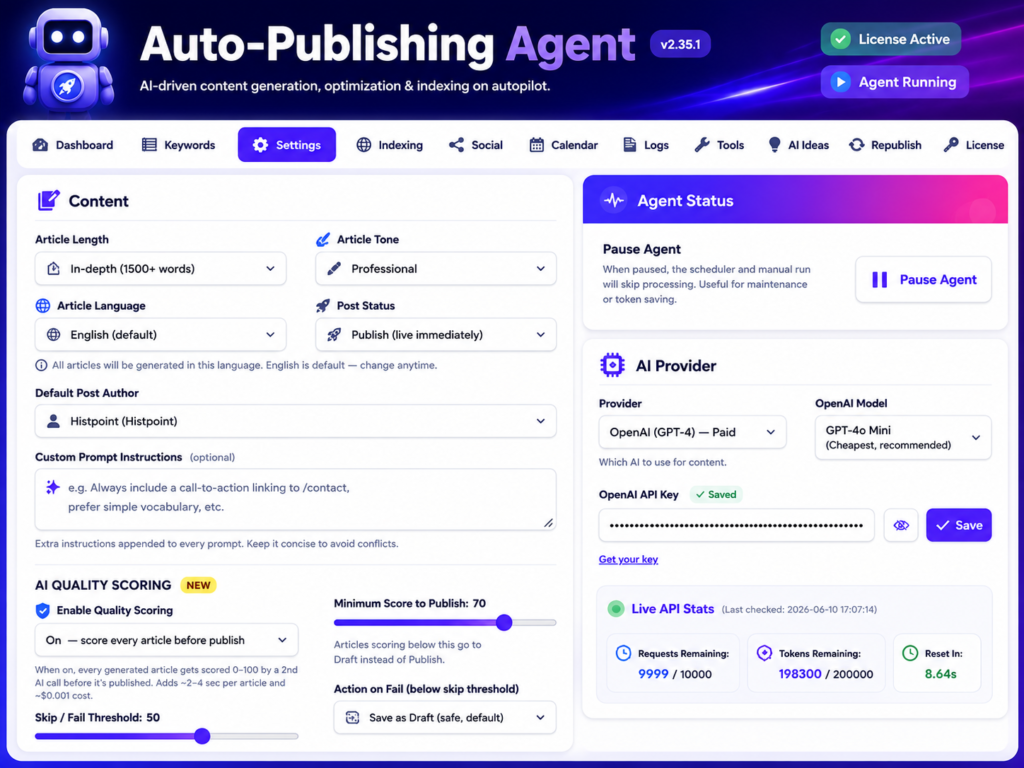
The state of WordPress in 2026
If you’re running a WordPress blog in 2026, you’re already losing if you’re still writing every article by hand.
Not because the writing is bad — but because the math doesn’t work anymore.
To rank for any meaningful keyword today, you need 30+ articles in your topical cluster. To grow traffic, you need to publish 4+ times per week consistently. To compete with established sites, you need to publish in 35 languages, post to 4 social platforms, and refresh old content quarterly.
If you do all of that manually, it costs $4,500-$12,000 per month in freelancers, social managers, and SEO consultants. If you do it yourself, you have no time left to actually run your business.
This is why AI WordPress automation has gone from “experimental novelty” to “essential infrastructure” in the last 18 months.
In this guide, I’ll walk through the full architecture of an automated WordPress publishing system in 2026: every component, every decision point, every tool that’s actually worth your money. I run 4 blogs through this exact stack, publishing 18 articles per week as a one-person team. Total monthly tool cost: under $40.
Let’s break it down.
What is AI WordPress automation, exactly?
AI WordPress automation is the practice of using AI models, plugins, and APIs to handle the entire content publishing pipeline — from idea generation to indexed-and-ranking — without manual writing, designing, or scheduling.
A fully automated workflow looks like this:
You set a niche, an AI provider, and a publishing schedule once. Then every day or week, the system:
- Picks topics based on your keyword strategy and trending searches
- Researches the topic using current sources
- Writes a 2,000+ word article in your brand voice
- Generates custom images via FLUX, gpt-image-1, or similar
- Optimizes the post for SEO — title, meta, schema, internal links, focus keyword
- Publishes to WordPress on schedule
- Submits the URL to Google Indexing API for fast crawl
- Cross-posts to Pinterest, Facebook, X, LinkedIn with platform-specific captions
- Tracks clicks, impressions, and rankings in Search Console
- Refreshes older posts every 90 days with new sections and updated stats
You watch this happen from a dashboard. You don’t write a single word.
This isn’t theoretical. This is what serious bloggers, agencies, and ecommerce operators are doing right now. The only question is whether you’re doing it too.
Why 2026 is the year this finally works
AI content generation isn’t new — people have been “auto-blogging” since 2015. But the previous decade of attempts failed for predictable reasons: the models couldn’t actually write, the images looked plastic, Google penalized obvious AI content, and the tools required developer-level setup.
Four things changed in 2024-2025 that flipped the equation:
1. AI models hit human-grade quality
GPT-4, Claude 3.5, Gemini 2.5 Pro, and the open-source FLUX image models all crossed the threshold where output is genuinely indistinguishable from human work to a casual reader. The same article that got 200 monthly searches in 2022 (because it was AI-written and obvious) now ranks on page 1 because the writing is good.
2. Google’s March 2024 spam policy made AI content explicitly OK
Google’s official position is now: AI-generated content is fine if it’s helpful, original, and people-first. They’re penalizing low-effort spam (whether human or AI), not the use of AI itself. As long as your AI workflow includes brand voice training, citation injection, and quality scoring, you’re well within Google’s guidelines.
3. AI compute costs dropped 99%
In 2022, generating a 2,000-word article cost $0.50-$1.20 in API calls. Today, with Gemini’s free tier and Cloudflare Workers AI’s free image generation, the same article costs effectively $0. Your AI bill scales from $0 to $20/month even at 100 articles per month.
4. The tooling matured
Plugins like WP Auto Agent now handle the entire pipeline in a single WordPress install. No need to wire 8 different tools together with Zapier, no Python scripts to maintain, no API key juggling. Install, paste keys, set schedule. Done.
These four shifts compound. The cost dropped, the quality rose, the legal/SEO risk evaporated, and the setup complexity collapsed. The result: 2026 is the year automated WordPress publishing actually works for solo creators, not just enterprise teams.
The 7 components of a fully automated WordPress workflow
Every serious automation stack in 2026 includes these 7 components. You can build them with multiple separate tools, or use an all-in-one solution. But you need all 7 working together — leaving out even one breaks the chain.
Component 1: AI content generation
Writes the articles in your brand voice.
Component 2: AI image creation
Generates featured images and Pinterest pins.
Component 3: SEO optimization (automatic)
Handles title tags, meta descriptions, schema markup, focus keywords.
Component 4: Social media distribution
Auto-posts to Pinterest, Facebook, X, LinkedIn with platform-specific captions.
Component 5: Search engine indexing
Submits new URLs to Google Indexing API for fast crawling.
Component 6: Performance tracking
Pulls data from Search Console and GA4 into one dashboard.
Component 7: Content refresh & republishing
Refreshes old articles quarterly to recover lost rankings.
Let’s go through each component in detail.
Component 1 — AI Content Generation
The heart of the system. Without good content, nothing else matters.
What good AI writing looks like in 2026
Old AI writing (2022-2023) was:
- Generic and bland
- Padded with filler (“In today’s fast-paced world…”)
- Wrong on facts
- Same tone for every topic
- Obviously machine-generated
Modern AI writing (2025+) is:
- Specific with real numbers and data points
- Tight, no filler
- Citation-aware
- Adapted to your brand voice
- Indistinguishable from human work to most readers
The difference comes from three things:
Better base models. GPT-4o, Gemini 2.5 Pro, and Claude 3.5 Sonnet write fundamentally better than their predecessors. The model is doing 90% of the work.
Better prompting. Modern publishing tools use multi-step prompts (research → outline → draft → revise) instead of single-pass generation. Each step refines the output.
Quality scoring before publish. AI-written articles now get scored 0-100 across readability, EEAT signals, originality, depth, and SEO compliance — before they go live. Below-threshold articles auto-rewrite or get held for human review.
Brand voice training
The single biggest improvement in modern AI publishing is brand voice. You feed the system 5-10 of your existing articles, and it extracts your voice fingerprint: sentence length, vocabulary, recurring phrases, perspective (first vs third person), tone (formal vs casual).
Then every future article matches that voice. This is what separates “AI-generated” from “AI-augmented” — the former sounds robotic, the latter sounds like you.
35-language support
If you’re targeting non-English markets, modern tools natively generate content in 35+ languages — not awkward translations, but native-level writing. Spanish output sounds like a Spanish writer. Japanese output sounds like a Japanese writer. This unlocks global SEO that was impossible for solo creators five years ago.
Recommended setup for Component 1
- AI provider: Gemini 2.5 Pro (free tier handles 1,500 requests/day) or GPT-4o ($0.50 per article)
- Tool: WP Auto Agent’s article generation engine
- Quality threshold: 75+ on AI Quality Score before auto-publish
- Voice training: 8 sample articles minimum
- Length target: 1,800-3,500 words per article
- Format: H2 headers, short paragraphs, internal links, citations
For a complete deep-dive on AI content generation, see our companion article on how to use AI to write WordPress content.
Component 2 — AI Image Creation
Every article needs a featured image. Most need 3-5 inline images. Pinterest pins multiply that 10x. If you’re generating 100 articles per month and each needs 5 images, that’s 500 images per month — way too many to source manually.
Why AI-generated images beat stock photos
Stock photos have three problems:
- Same images appear on competitor sites (Pexels, Unsplash, Shutterstock are saturated)
- Generic — none specifically match your article topic
- License headaches when you scale
AI-generated images solve all three:
- Every image is unique to your site
- You can make ANY scene match your exact article context
- Commercial-use rights are clear and free (with most providers)
The visual difference also matters. Pinterest, in particular, rewards unique imagery. Pins with distinctive AI-generated visuals get 3-5x more saves than pins with stock photos.
The 7 image provider landscape in 2026
| Provider | Cost | Quality | Best use |
|---|---|---|---|
| Cloudflare Workers AI (FLUX) | Free, 230/day | High | Default choice — free + good |
| OpenAI gpt-image-1 | $0.04/image | Very High | When you need photorealism |
| Nano Banana | $0.03/image | Very High | Artistic/stylized work |
| DALL-E 3 | $0.04/image | High | OpenAI ecosystem users |
| Pexels | Free | Real photos only | When AI can’t render the subject |
| Pixabay | Free | Real photos | Backup to Pexels |
| Pollinations | Free | Medium | Quick low-stakes images |
Recommended setup for Component 2
For most blogs, use Cloudflare Workers AI as primary (free, 230/day = plenty for any solo blog). Fall back to Pexels when AI can’t generate something accurately (real medical equipment, specific buildings, real human faces).
For Pinterest specifically, your tool should auto-generate 5-10 unique pins per article with format variations: vertical listicle, before/after split, number banner, question hook, multi-step recipe card.
For a deep-dive on choosing image tools, see best AI image generators for WordPress in 2026.
Component 3 — SEO Optimization (Automatic)
The article is written. Images are made. But if you’re not tagging it correctly, Google won’t show it to anyone.
A modern automation stack handles SEO automatically:
Title tag optimization
Generated dynamically per article using the focus keyword + benefit + brand pattern. Stays under 60 characters. Includes power words (Complete, Guide, 2026, Real Numbers).
Meta description
Auto-generated from first paragraph + focus keyword + CTA. 150-155 characters. Compelling enough to lift CTR.
Schema markup
Article schema is auto-applied to every blog post by Rank Math or your SEO plugin. Custom schemas (HowTo, FAQ, Recipe) are added based on article type detection.
Internal linking
The plugin scans your existing articles for related topics and adds 2-3 internal links per new article. This builds topical authority and keeps users on your site.
Focus keyword tuning
The keyword you target is automatically placed in: H1, first paragraph, URL slug, image alt text, and 3-5x throughout the body — naturally, not stuffed.
This automation is the difference between “I wrote a blog post” and “I published a fully optimized SEO asset.” The latter ranks. The former doesn’t.
For deeper SEO automation strategies, see AI SEO automation for WordPress.
Component 4 — Social Media Distribution
Publishing the article isn’t enough. Distribution is half the equation.
Why distribution matters
A 2,000-word ranked article + zero social distribution = mediocre traffic.
A 2,000-word ranked article + 4 platforms cross-posted = 2-3x more traffic via referral + social signals back to Google.
The platforms that matter for WordPress bloggers:
Pinterest — by far the highest-ROI platform for blog content. A single pin can drive 50-200 visits per month for years. Pin SEO is its own discipline.
X / Twitter — drives traffic from active communities. Quality over quantity.
LinkedIn — best for B2B content (SaaS, marketing, consulting niches).
Facebook — declining but still relevant for niche groups and older demographics.
Platform-specific captions
You can’t just paste the same caption to all 4 platforms. Each has its own conventions:
- Pinterest: descriptive caption with keyword + benefit, hashtag-light
- X: punchy hook, 280 chars, 2-3 hashtags max
- Facebook: longer story-format caption, emoji-friendly
- LinkedIn: professional tone, longer, with line breaks for readability
Modern tools auto-rewrite the caption per platform using AI. One article → 4 unique captions, each optimized for its platform.
Pinterest pin SEO
Pinterest is special because each article should generate 10-30 unique pins (not just one). Each pin has its own title, description, and image variant. This multiplies the article’s reach.
Modern tools handle this with a “pin generator” that creates the variants automatically.
For the full guide, see how to auto-post WordPress to Pinterest, Facebook, X, and LinkedIn.
Component 5 — Search Engine Indexing
You published the article. It’s optimized. It’s distributed. But Google hasn’t crawled it yet.
For new domains, Google’s normal crawl cycle takes 1-4 weeks. That’s 4 weeks of zero traffic potential. For aging articles, recrawls take even longer.
The fix: Google Indexing API.
What the Indexing API does
You ping Google: “I just published this URL.” Google adds it to the priority crawl queue. Within 4-12 hours, the URL is indexed and starts appearing in search results.
This used to be a manual API setup. Modern WordPress plugins now handle it automatically — every time you publish, the URL gets pinged.
Real impact
With Indexing API integration, articles I publish at 9 AM are typically indexed and showing impressions in Search Console by 9 PM the same day. Without it, the same articles took 18-23 days to even get crawled when I first started.
This isn’t a small optimization. This is the difference between “I’ll see traffic in a month” and “I’ll see traffic tomorrow.”
For step-by-step setup, see Google Indexing API for WordPress.
Bing Indexing API
Bing has its own Indexing API. Most automation tools support both. Bing traffic is smaller but easier to rank for — worth enabling.
Component 6 — Performance Tracking
If you can’t measure it, you can’t improve it.
A modern automation stack pulls data from:
Google Search Console — clicks, impressions, queries, ranking positions, indexing status
Google Analytics 4 — sessions, bounce rate, conversions, traffic sources, user paths
WordPress — published article count, scheduled queue, AI generation logs
…and combines them in one dashboard.
You should be able to see, at a glance:
- How many articles published this week
- Total clicks vs last week
- Which articles are gaining traffic (and which are decaying)
- Average AI Quality Score this week
- Which keywords are climbing
- Which articles need refresh
If your tool doesn’t show you this, you’re flying blind.
Component 7 — Content Refresh & Republishing
Every article you publish has a half-life.
The data is consistent across millions of articles studied: an article hits peak traffic 6-12 months after publishing, then begins a slow decline. Without intervention, an article you wrote in January 2025 is pulling 30-40% less traffic by January 2026, and 60-70% less by January 2027.
Why? Three reasons:
- Content gets stale — stats outdated, new tools mentioned, broken links
- Newer competitors enter — fresher content from rivals out-ranks yours
- Search intent shifts — what people Googled “X tutorial” for in 2025 might be slightly different by 2027
The fix: republishing.
What republishing actually means
It’s NOT just hitting “update” with the same content. Republishing means:
- Adding 1-2 new sections with current information
- Updating any stat or year reference
- Replacing old screenshots / images
- Adding internal links to articles published since
- Updating the publish date so Google sees it as fresh
- Optionally: changing the title to current year
Articles republished this way regain 60-90% of their lost traffic within 4-6 weeks. Some recover MORE traffic than they originally had.
Auto-republish at scale
Manually republishing 100+ articles per quarter is impossible. Modern tools automate this:
- The tool identifies articles below their peak traffic
- Generates new sections via AI based on current data
- Updates stats automatically (current year, fresh numbers)
- Refreshes images
- Bumps the publish date
- Pings Google Indexing API for re-crawl
This single feature can recover thousands of dollars in lost affiliate revenue or ad income.
For more, see how to auto-republish old WordPress content.
Choosing the right tools
You have two paths.
Path A — Component-by-component (multiple tools)
Patch together separate tools for each component:
- Content: ChatGPT Plus ($20/mo) + Surfer SEO ($59/mo)
- Images: Midjourney ($20/mo) or DALL-E
- SEO: Yoast or Rank Math (free)
- Social: Buffer ($6/mo) + Tailwind ($15/mo)
- Indexing: Custom script or Rank Math Pro
- Tracking: Google Search Console + GA4 (free)
- Refresh: Manual or no automation
Total cost: $120-$300/month. Coordination overhead: substantial.
Path B — All-in-one (single integrated tool)
A modern publishing engine like WP Auto Agent handles all 7 components from one WordPress plugin. Single license, single dashboard, single workflow.
Total cost: $99/year (Pro plan). Coordination overhead: zero.
The honest math: Path A makes sense if you’re already invested in those individual tools. Path B is dramatically cheaper and easier for new operators.
Either way, the goal is the same: all 7 components working together. The choice is just how you assemble them.
Implementation Roadmap
Don’t try to set everything up in one weekend. Use this phased approach.
Week 1 — Foundation
- Install WordPress + your chosen automation stack
- Connect Google Search Console + GA4
- Set up Indexing API
- Configure your AI provider keys (Gemini free tier is enough)
- Pick 1 image provider (Cloudflare FLUX for free, gpt-image-1 for premium)
Weeks 2-4 — First batch
- Train brand voice with 5-10 sample articles
- Set publishing schedule: 3-4 articles per week
- Watch the first 12 articles publish
- Manually review each before they go live (use Draft mode)
- Tune the AI Quality Score threshold based on results
Months 2-3 — Velocity
- Switch to auto-publish mode (full autopilot)
- Push to 4-5 articles per week
- Connect social distribution (Pinterest first, then others)
- Monitor Search Console daily for indexing
Months 4-6 — Optimization
- Review article performance weekly
- Refresh underperforming articles
- Identify your highest-traffic article and create cluster posts around it
- Add WooCommerce integration if you have a store
Month 6+ — Scale
- Push to 6-8 articles per week if traffic supports it
- Add second or third blog using same stack
- Consider Pro / Agency plans if managing multiple sites
The biggest mistake people make is trying to perfect the system before publishing. Don’t. Start ugly, fix as you go. The automation gets better the more articles run through it.
7 Common Mistakes to Avoid
1. Publishing without a quality threshold
Don’t auto-publish raw AI output. Set a quality score threshold (75+ recommended) and let articles below it auto-rewrite or hold for review.
2. Skipping brand voice training
Generic AI articles get penalized over time as Google’s spam detection improves. Voice training keeps your content distinct and on-brand.
3. Using stock photos
AI-generated images perform 3-5x better on Pinterest. Stock photos don’t differentiate your blog from competitors.
4. Skipping the Indexing API
Without it, you’re waiting 2-4 weeks for every article to even get crawled. With it, 4-12 hours. This single setting changes the perceived speed of your entire operation.
5. Auto-pilot without monitoring
“Set it and forget it” works after you trust the system. In months 1-2, check the dashboard daily. After month 3, weekly is enough.
6. No refresh strategy
Articles decay. Without a quarterly refresh loop, your traffic curve plateaus and eventually declines. Refresh recaptures 60-90% of lost rankings.
7. Wrong AI provider for the niche
Some providers are better at specific content types. Gemini handles long-form best. GPT-4o handles structured how-tos. Claude handles tonal nuance. Test 2-3 in your niche before committing.
ROI Calculation
Let’s compare a fully automated WordPress operation vs traditional manual publishing.
Traditional manual setup
- 4 articles/week × $250 freelancer = $1,000/week → $4,000/month
- Featured images: $300/month
- Social media manager: $500/month
- SEO consultant: $400/month
- Total: $5,200/month
Output: 16 articles/month, mediocre social distribution, manual indexing, no refresh loop.
Automated setup with WP Auto Agent Pro
- WP Auto Agent: $99/year ($8.25/month amortized)
- AI API (Gemini free tier): $0
- Image generation (Cloudflare free tier): $0
- Hosting: ~$10/month
- Total: ~$18/month
Output: 16+ articles/month, automatic 4-platform social distribution, instant indexing, automatic refresh loop.
The difference
$5,200 vs $18 = 289x cost reduction
For the same quality output. With less manual oversight. And the automation continues running while you sleep, take vacation, or focus on other parts of the business.
This isn’t an exaggeration. This is the real economics of 2026 content marketing.
Frequently Asked Questions
Will Google penalize AI-generated content?
No. Google’s official position (March 2024 spam policy update): AI content is fine if it’s helpful, original, and people-first. They penalize low-effort spam regardless of source. A well-prompted AI workflow with quality scoring meets every Google guideline.
Do I need to pay for OpenAI / Gemini?
Not necessarily. Gemini’s free tier (1,500 requests/day) handles a single blog publishing 4 articles/day with room to spare. Cloudflare Workers AI is free for images. Most solo bloggers spend $0/month on AI.
Can the AI match my specific brand voice?
Yes — modern voice training feeds 5-10 of your existing articles to the AI as samples. The output then matches your sentence length, vocabulary, perspective, and tone. After training, even your closest readers usually can’t tell which articles you wrote vs which the AI wrote.
Does it work for non-English content?
Yes — modern tools natively generate in 35+ languages with native-quality output. This unlocks markets that were previously inaccessible to solo creators.
Will it work for WooCommerce / ecommerce?
Yes. Modern automation tools include bulk product description generators that can write for hundreds of WooCommerce products at once. Output includes SEO meta tags and conversion-optimized copy.
How long until I see traffic?
Articles typically index within 12 hours (with Indexing API). Initial impressions show in Search Console within 1-3 days. Real click traffic builds over 60-180 days as the site gains topical authority. Most bloggers see meaningful traffic by month 3-4.
Final Thoughts: The Future Is Already Here
The biggest mistake you can make in 2026 is dismissing AI WordPress automation as “for later” or “for big businesses only.”
Solo bloggers are using these stacks today to outpublish entire marketing teams from 5 years ago. Agencies are managing 10x more client sites with smaller staffs. Ecommerce founders are filling product catalogs that would have taken months in days.
The technology is here. The cost is near-zero. The legal/SEO landscape is favorable. The remaining gap between “you” and “an automated WordPress operation” is just 90 minutes of setup.
If you’re serious about WordPress content in 2026, the question isn’t whether to automate — it’s how soon.
Want to see exactly how this looks in practice? WP Auto Agent is the AI publishing engine I built and use to run my own blogs. All 7 components in a single WordPress plugin, with a 30-day money-back guarantee.