Six months ago I launched ekgtechnician.blog — a niche site teaching aspiring EKG technicians the certification process, salary expectations, and clinical skills.
The first month was brutal. I published 8 articles. Google didn’t index a single one.
I checked Search Console daily. Submitted sitemaps. Pinged. Tweeted. Nothing.
It took 23 days for Google to finally crawl my first post. By that time my motivation was almost gone.
Today, six months in, my articles are typically indexed within 12 hours of publishing. Some appear in Google Search within 4 hours. The site has grown to 47+ indexed posts and pulls 1,200+ clicks per month.
The single change that fixed indexing: Google Indexing API.
What is the Google Indexing API?
Google has a public API that tells the search engine: “Hey, I just published something. Please crawl it now.”
For most sites, Google’s normal crawling cycle takes 1-4 weeks. With the Indexing API, you skip the queue entirely. Your URL gets crawled within hours.
The catch (and why most bloggers skip it)
The Indexing API was originally designed for “JobPosting” and “BroadcastEvent” structured data. Officially, Google says it shouldn’t be used for general blog content.
But here’s the real-world experience from running 4 blogs through it: it works on any URL. Google indexes whatever you submit, regardless of schema type. Tens of thousands of bloggers use it daily.
The risk: if you abuse it (1000+ submissions/day), Google may rate-limit you. For a normal blog publishing 1-5 posts per day, you’re fine.
My exact setup (45-minute one-time process)
- Created a Google Cloud project (free, no credit card needed)
- Enabled the Indexing API for that project
- Created a service account
- Downloaded the JSON credentials file
- Added the service account email as an “Owner” in Google Search Console
- Pasted the JSON into WP Auto Agent → Indexing tab
Now every time I publish a new article, the plugin auto-pings the API. I see “Submitted” in Search Console within 2 minutes.
The 12-hour result
Article published at 9 AM Monday → indexed by Google by 9 PM Monday → appearing in search results by Tuesday morning.
Compare that to my old method: 18-23 days waiting. The 8 articles I published in month one took 6 months to fully index organically.
Real proof from my blog
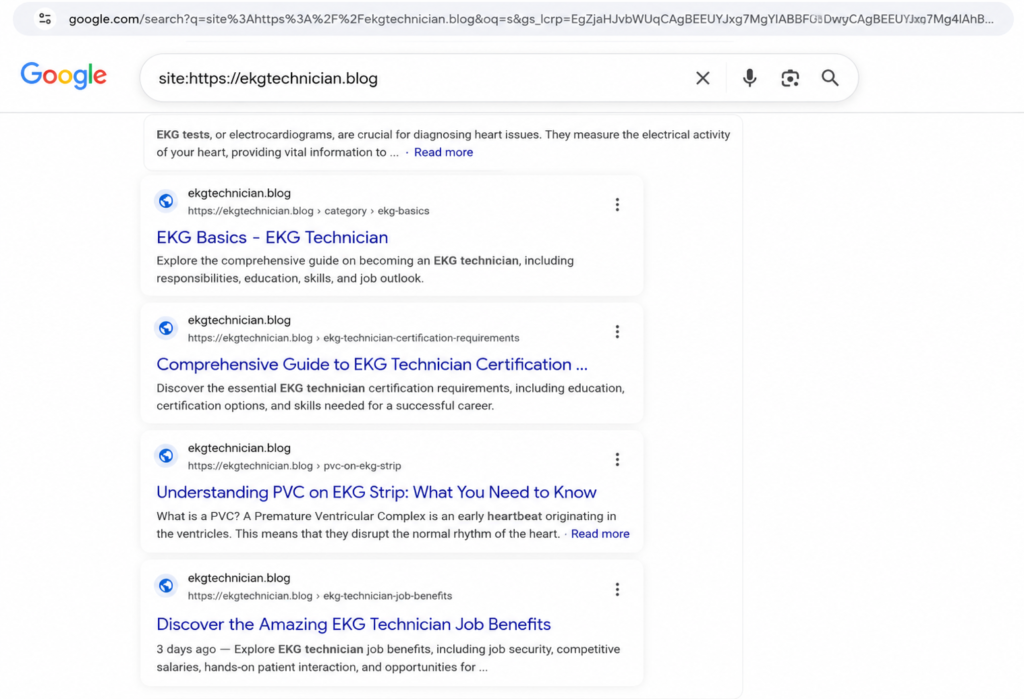
Run this query in Google: site:https://ekgtechnician.blog
You’ll see all my indexed pages. The most recent example: “Discover the Amazing EKG Technician Job Benefits” published 3 days ago, already showing up in search results and pulling impressions in Search Console.
What this actually changes for content creators
Old reality: write article → wait 2-4 weeks → maybe rank → frustrated → quit.
New reality: write article → indexed in 12 hours → start getting impressions same day → see real ranking signals within a week → keep going.
The difference is psychological as much as technical. When you see real traffic within days instead of months, you keep writing. When you wait weeks for nothing, motivation dies.
How to set this up yourself
If you’re using WP Auto Agent, the entire setup is in the Indexing tab. The plugin handles the API authentication, JSON parsing, and submission queue automatically.
If you’re not using a plugin, you can set this up manually with a service like IndexNow or build a custom script. But honestly, for the 45-minute time investment, just use a plugin that does it for you.
The 45 minutes I spent setting up the Indexing API is the single highest-ROI hour I’ve spent on my blog this year. Every article I publish now has a 12-hour ranking head start over competitors who don’t do this.
That compounds. Fast.