How to integrate AI chatbots in WordPress
Understanding AI Chatbots and Their Benefits
Have you ever wondered how AI chatbots can transform your WordPress site? These intelligent assistants not only enhance user experience but also boost engagement and can even increase sales. By integrating AI chatbots into your WordPress site, you can provide real-time assistance to your visitors, answer their queries instantly, and guide them through the purchasing process.
One of the most significant advantages of AI chatbots is their ability to operate 24/7. Unlike human customer service, which has limitations based on working hours, chatbots are always available. This means your customers can get help whenever they need it, leading to higher satisfaction and improved conversion rates. Moreover, chatbots can handle multiple inquiries simultaneously, ensuring no customer is left waiting.
For instance, a small e-commerce store I worked with implemented a chatbot that answered common inquiries about shipping and return policies. Within a few weeks, they reported a 30% reduction in customer service emails, showing how much time and resources they saved. Chatbots can truly act as the frontline workers of your digital customer service.
In addition to enhancing customer support, integrating AI chatbots in WordPress can also provide valuable insights into customer behavior. By analyzing interactions, you can understand what your visitors are looking for and tailor your services accordingly. This data-driven approach not only enhances your marketing strategy but also helps you improve your overall website experience. For example, by examining chat logs, you might discover that many users are asking about a particular product feature that isn’t prominently listed on your site.
Choosing the Right AI Chatbot for Your WordPress Site
When it comes to selecting an AI chatbot for your WordPress site, you’ll find various options available. Each comes with unique features and pricing structures. Here are some crucial factors to consider when making your choice:
- Ease of Integration: Ensure the chatbot you choose integrates smoothly with WordPress. Look for plugins that are easy to install and configure. For example, both Tidio and WP-Chatbot are popular for their straightforward setup processes.
- Customization Options: Choose a chatbot that allows you to customize messages and responses to match your brand’s voice. Personalization is key to engaging your audience. For instance, a travel agency might customize their bot to reflect a friendly, adventurous tone.
- Analytics and Reporting: Opt for a chatbot that provides insights into user interactions. Understanding how customers engage with the bot can help you adjust strategies over time. Some chatbots even offer heatmaps of interactions, showing where users click most often.
- Support and Updates: A reliable support system and regular updates are essential for any software. Choose a chatbot that offers solid customer support and is frequently updated with new features. This is especially important as technology and user expectations evolve.
Some popular AI chatbots for WordPress include Tidio, WP-Chatbot, and ChatBot.com. Each of these options has unique strengths, so it’s worth exploring them to find the best fit for your needs. For example, I once helped a client choose between Tidio and WP-Chatbot; Tidio won out due to its superior design flexibility and user interface.
Setting Up Your AI Chatbot in WordPress
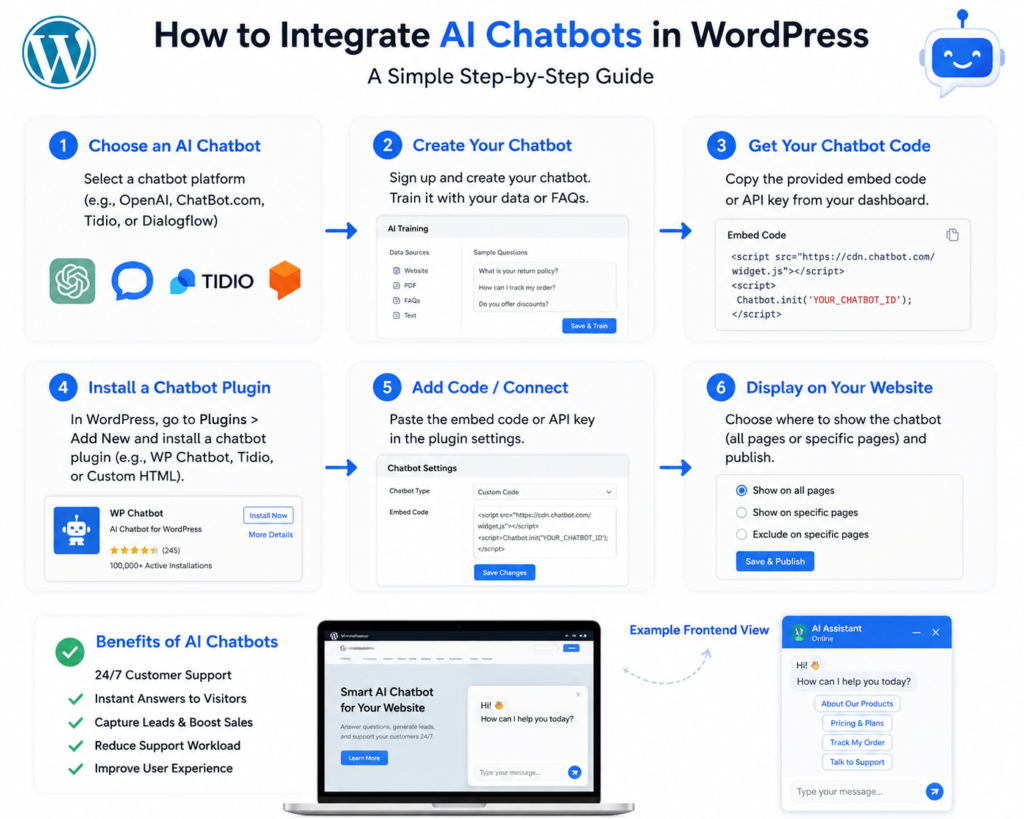
Once you’ve chosen your AI chatbot, the next step is to set it up on your WordPress site. Here’s a concise step-by-step guide to get you started:
- Install the Plugin: Go to your WordPress dashboard, navigate to the Plugins section, and click on “Add New.” Search for your chosen chatbot plugin and click “Install Now.” After installation, make sure to activate it.
- Configure Settings: After activation, you’ll typically find a new menu item for the chatbot in your dashboard. Click on it to access settings. Here, you can customize the chatbot’s appearance, set up automated responses, and adjust operational hours.
- Connect to Your Messaging Platforms: If your chatbot supports integration with platforms like Facebook Messenger or WhatsApp, follow the instructions provided to connect them. This will extend your chatbot’s reach beyond your website. I’ve seen businesses double their engagement simply by making their chatbots accessible on multiple platforms.
- Test Your Chatbot: Before going live, it’s essential to test your chatbot. Engage with it as if you were a user and check for any issues. Make adjustments as necessary. Create various scenarios that customers might encounter, ensuring the bot responds appropriately.
- Launch and Monitor: Once you’re satisfied with the setup, go ahead and launch your chatbot. Keep an eye on its performance and user interactions for ongoing improvements. I recommend scheduling regular check-ins to review data and tweak settings as necessary.
Setting up an AI chatbot might seem daunting, but with the right plugin and guidance, it’s a straightforward process that can significantly enhance your WordPress site. Remember, the effectiveness of your chatbot largely depends on how well it’s configured and maintained. WP Auto Agent vs ChatGPT for WordPres: A Comprehensive Analysis
Customizing Your Chatbot for Better Engagement
The true power of AI chatbots lies in their ability to engage users effectively. Here’s how you can customize your chatbot for better user interaction:
- Personalized Greetings: Start conversations with personalized greetings. Use visitor data to tailor the initial message, making users feel valued right from the start. For example, if you know a user is returning to your site, greet them with “Welcome back! How can I assist you today?”
- Predefined Responses: Create predefined responses for frequently asked questions. This speeds up response time and ensures consistency in the information provided. I once set up a chatbot for a local coffee shop that handled orders and common questions, freeing up baristas to focus on in-store customers.
- Interactive Elements: Incorporate buttons and quick replies to guide users through options. This makes interactions more engaging and user-friendly. Users appreciate a clear path to answers rather than typing out lengthy questions.
- Fallback Messages: Not every question will have a predefined answer. Set up fallback messages that direct users to human support if the chatbot can’t assist. It’s crucial to make users feel heard, even if their questions exceed the bot’s capabilities.
- Regular Updates: Regularly update the bot’s knowledge base to reflect new products, services, or changes in your business. This keeps the chatbot relevant and helpful over time. A client of mine noticed significant improvements in user satisfaction after we updated their bot with new FAQs.
By following these steps, you can create an AI chatbot that feels personal and engaging, encouraging users to interact more frequently. The more you tailor the experience, the more likely users will return to engage again.
Integrating AI Chatbots with Other Tools
To maximize the effectiveness of your AI chatbot, consider integrating it with other tools and platforms. Here are some integrations that can enhance your chatbot’s capabilities:
- CRM Systems: Connect your chatbot with a CRM like HubSpot or Salesforce. This allows the bot to pull customer data, providing more context for interactions and enabling better follow-ups. For instance, a real estate business can use CRM data to offer personalized property suggestions.
- Email Marketing Tools: Integrate with tools like Mailchimp to capture leads directly from your chatbot. This helps build your email list effortlessly. I’ve seen chatbots collect hundreds of email addresses within weeks just by asking users if they want to receive updates.
- Analytics Platforms: Linking your chatbot to Google Analytics can provide insights into user behavior, helping you refine your marketing strategies. You can track how many users interact with the bot and what questions are most common.
- Payment Processors: If your chatbot handles transactions, ensure it integrates with payment processors like PayPal or Stripe for a smoother purchasing experience. This is especially useful for businesses that sell products directly through their chatbots.
Integrating these tools can significantly enhance your chatbot’s functionality, leading to improved customer service and better user experiences. A well-integrated chatbot acts not just as a support tool but as a comprehensive part of your business’s digital strategy.
Monitoring and Analyzing Chatbot Performance
Once your AI chatbot is live, monitoring its performance is crucial. This ensures it’s effectively meeting users’ needs and provides insights for improvements. Here are some key metrics to track:
- Engagement Rate: Track how many users interact with your chatbot versus the total number of visitors. A high engagement rate indicates that users find the chatbot helpful. For example, if 70% of your visitors engage with the bot, that’s a strong indicator of its value.
- Response Time: Measure how quickly your chatbot responds to inquiries. Faster response times typically lead to higher satisfaction rates. Aim for responses in under 5 seconds for optimal engagement.
- Resolution Rate: Analyze how many queries the chatbot resolves without needing human intervention. A high resolution rate shows that the chatbot is effective. For example, a rate of 85% or higher is a solid benchmark for most businesses.
- User Feedback: Encourage users to leave feedback after interactions. This qualitative data can offer valuable insights into areas needing improvement. You might even integrate a simple thumbs-up/thumbs-down feedback system for quick assessments.
By regularly reviewing these metrics, you can make informed adjustments to your chatbot, enhancing its performance and improving user satisfaction. I recommend setting monthly reviews to assess performance and plan necessary adjustments.
Common Challenges and How to Overcome Them
Integrating AI chatbots in WordPress isn’t without its challenges. Here are some common issues you might encounter and tips on how to address them: Boost Your Sales with a WooCommerce Bulk Product Description Writer
- Technical Issues: Sometimes, chatbots may not function as intended due to technical glitches. Always have a tech support plan in place and regularly update your chatbot plugin to avoid these problems. I once faced a major issue with a plugin update that temporarily broke chatbot functionality; having a backup plan saved us.
- User Misunderstandings: Users might not always understand how to interact with the chatbot. To combat this, include clear instructions and prompt users with examples of how they can engage. A simple “Ask me about our products!” can guide them effectively.
- Limited Responses: If the chatbot’s responses are too limited, users may get frustrated. Regularly update the bot’s database with new information and common questions to keep interactions fresh. Feedback from users can provide insights into which areas need expansion.
- Privacy Concerns: Users may be hesitant to engage if they feel their data is not secure. Be transparent about data collection practices and ensure compliance with privacy regulations. A clear privacy policy displayed within the chatbot can help alleviate concerns.
By anticipating these challenges and having solutions in place, you can create a more effective and user-friendly chatbot experience. Staying proactive will help you maintain a positive relationship with your users.
Future Trends in AI Chatbots
The world of AI chatbots is continually evolving. Here are some emerging trends you should keep an eye on:
- Voice Interaction: As voice search becomes more prevalent, chatbots that support voice interaction will become increasingly important. Consider implementing voice capabilities in your chatbot for a more hands-free experience. This could particularly benefit industries like travel and hospitality.
- Multilingual Support: With global audiences, offering multilingual chatbots can significantly enhance user experience. This allows businesses to cater to diverse demographics. If your website attracts international visitors, consider multilingual capabilities as a priority.
- AI Personalization: Future chatbots will likely leverage more advanced AI to offer highly personalized experiences. This includes predicting user needs based on previous interactions. Imagine a chatbot that remembers a customer’s past purchases and suggests related items!
- Emotional Intelligence: As AI evolves, chatbots are expected to better understand and respond to human emotions, allowing for more empathetic interactions. This can create a more meaningful connection with users, especially in sensitive industries.
Staying updated on these trends will help you keep your chatbot relevant and effective in meeting user needs. Being ahead of the curve can position your business as a leader in customer service innovation.
FAQs
What are the best AI chatbots for WordPress?
Some of the best AI chatbots for WordPress include Tidio, WP-Chatbot, and ChatBot.com. They each offer unique features tailored for different business needs.
Can I integrate a chatbot with WooCommerce?
Yes, many chatbots can be integrated with WooCommerce, allowing them to assist customers with inquiries related to products, orders, and checkout processes. This integration can enhance the shopping experience significantly.
How do I test my chatbot before going live?
You can test your chatbot by simulating user interactions. Engage with it as a visitor would, and identify any areas that need improvement before launch. I recommend enlisting a few colleagues to act as beta testers.
Is it necessary to monitor my chatbot regularly?
Absolutely. Regular monitoring helps you assess performance, understand user interactions, and make necessary adjustments for better engagement. Schedule monthly reviews to keep your chatbot in peak condition.
Can chatbots handle multiple languages?
Many modern chatbots offer multilingual support, enabling them to communicate with users in various languages, which is essential for global businesses. This feature can significantly broaden your audience.